Pages

Get 1000 Likes Facebook Free

Get Free Youtube Views - TopFreeLikes.com
Showing posts with label SEO. Show all posts

Aggressive SEO Tools (More risky)

0

| In :

Some of these tools may risk getting your site banned.
• Free: Cooperative Ad Network … this essentially amounts to a huge link
farm, but it is blended in with many sites that are well integrated into the
web. Some search algorithms can look for temporal effects and deweight
rapidly rotating links. I currently am not using this ad network on any of
my sites, and probably would not use it on any site that I wanted to do well
longterm. It seems as though some older established sites can get away
with using this sort of stuff more than newly established sites, but they also
are risking losing more. (http://www.digitalpoint.com/tools/ad-network/)
• Free: Link Vault – acts similar to the Coop Ad Network, except it
provides static non-rotating links. (http://www.link-vault.com)
• Articlebot – creates multiple copies of semantically sound copy from a
single original article. I have not yet used Article Bot but have heard good
reviews, although some think the software is a bit complex to learn.
(http://www.articlebot.com/) On ThreadWatch someone noted that they
thought this tool might be sending some of its data back to someone
involved with creating the tool.
Any time you use an automated content generator that phones home you
may be doing niche discovery for someone else.
• Traffic Equalizer – scrapes search results and creates pages from them.
By default it likely leaves some footprints.
(http://www.trafficequalizer.com/)
• RSS Equalizer – creates static pages out of RSS feeds. Similar thoughts as
T.E. above. (http://www.rssequalizer.com/)
• Fantomaster – high end cloaking software. I have not yet used cloaking
software, but Fantomaster has a reputation for being the best in the
business. (http://fantomaster.com/)
• KloakIt – low cost cloaking software. (http://www.kloakit.com/)

SEO Link Checking Functions

0

| In :

Here are some ways to check backlink profiles using major search engines:
• Yahoo! links – search for link:seobook.com to find links to that specific
page via Yahoo! Site Explorer http://siteexplorer.search.yahoo.com/
Site Explorer also allows you to filter out internal backlinks to be able to
get a better view of external inbound links
• Yahoo! Site links – shows links pointing to any page on a site. Uses the
same structure as above, but use linkdomain: instead of link:
• Yahoo! .edu links – links from .edu and .gov type websites may be trusted
more than typical links. You can view the .edu links pointing at
SeoBook.com using this link
http://search.yahoo.com/search?p=linkdomain:www.seobook.com%20%2Bsite:.edu%20-site:.com%20-site:www.seobook.com
• Google backlink check – use link:seobook.com, but please note that
Google only shows a small sample of the links they know of.
• Google similar pages check - related:http://www.seobook.com/ shows
sites which Google thinks are related to SEO Book.
• Google Blogseach Backlinks – Google’s Blogsearch will show you recent
links from blogs to any page on a particular site. On
http://blogsearch.google.com/ use link:seobook.com
Technorati – shows blog links similarly to how Google Blogsearch does.
Search at http://www.technorati.com for www.seobook.com
• Microsoft offers similar link functions as Yahoo!. Like Yahoo!, Microsoft
tends to show a larger and more comprehensive sample of linkage data
than Google.
• MSN reciprocal link checking feature. Microsoft allows you to see which
sites a domain links at using LinkFromDomain:seobook.com
By searching for links that are both to and from a domain you can see
which links are reciprocal links in nature and help further identify the local
topical community
http://search.msn.com/results.aspx?q=linkfromdomain%3Aseobook.com+linkdomain%3Aseobook.com

What is SEO?

0

| In :


Search Engine Optimization means changing words
and links to cause search engines to list web sites in
the top results for certain search words or phrases.
In other words, SEO is the process of optimizing a
site, and links to a site, to get a higher position.
This case study covers the basics of on site SEO
that can lead to these results.

General SEO Tools: Commonly used tools

0

There are many various tools which help make the job of SEO quicker. These are
some of my more commonly used tools. All the tools in this section are free.

• FireFox browser – browser allows tabbed browsing, which saves a ton of
time when I am looking at about a half dozen sites at the same time.
(http://www.mozilla.org/products/firefox)
• Firefox Bookmarks and Extensions – extensions and bookmarks I use to
customize Firefox to make SEO easier.
(http://tools.seobook.com/firefox/bookmarklets.html)
• Internet Explorer
(http://www.microsoft.com/windows/products/winfamily/ie/default.mspx)
• Internet Archive – shows the history of websites.
(http://www.archive.org/)
• Digital Point keyword ranking, backlink, and PageRank checker – I use this
tool to view my position for various websites in Google, Yahoo!, and
MSN. It also helps me hypothesize some of the ways they may have
changed their algorithms.
(http://www.digitalpoint.com/tools/keywords)
• Xenu Link Sleuth – finds broken links on your site, and helps you build a
sitemap. (http://home.snafu.de/tilman/xenulink.html)
• Sitemaps Protocol – official xml sitemap protocol supported by the major
search engines. Please note that these xml sitemaps are different than your
internal sitemaps. (http://www.sitemaps.org/)
• Free Meta Tag Generator – helps you create the code for your page title
and meta tags
(http://tools.seobook.com/meta-medic/)
• The Google Toolbar – good for highlighting keyword proximity and usage
and doing many things like giving you a quick glimpse of a cached copy of
a page. (http://toolbar.google.com/) If you are doing lots of exceptionally
aggressive promotional techniques it may be unwise to install any toolbar
distributed by a major search engine since it will help them track and cross
reference your sites.
• Google Toolbar buttons - if you use the Google toolbar for Internet
Explorer you can create custom buttons to act as an RSS reader or link to
various useful tools, like a site’s WhoIs history. I created a number of
buttons here (http://tools.seobook.com/buttons/)
• Show IP – FireFox extension shows what IP Google results are coming
from (http://l4x.org/site/node/1078)
• GoLexa – SEO Swiss Army Knife tool (http://www.golexa.com/)
• Office application. Things like spreadsheets make life much easier as an
SEO. I use MicroSoft Office sometimes (http://office.microsoft.com/)
and sometimes I use OpenOffice (http://www.openoffice.org/). Either
will probably work for most jobs. OpenOffice can create PDF documents
for free. The newest beta version of Internet Explorer also can produce
PDF documents from web pages.
• Myriad Search – meta search service which makes it easy to compare the
top search results from the major search engines
(http://www.myriadsearch.com/)
• Espion – Free download application which makes it easy to change your
user agent to check for user agent based cloaking.
(http://tools.webguerrilla.com/new-browser-app/)
• Content generation & scripting: http://www.elance.com is an online
auction where people bid on your projects. You can find real bad deals and
real gems there. http://www.constant-content.com is a content bank full
of content for sale. The US government and the BBC are also offering free
RSS feeds. Some people also use sites like http://craigslist.org/ to look for
affordable writers.

SEO Tools

0

| In :

Much of the craft to SEO is knowing how to use time effectively. SEO is
an extremely time intensive process. These are the tools I use to save
time with SEO. None of these links are affiliate links. I get paid nothing
to recommend these tools to you.

Social Bookmarking, Tags, & Buzz Tools
Tools that help you find rapidly spreading ideas. If you track what ideas are
spreading it may become easier to learn how to create ideas that spread.
As the web becomes more social SEO will continue to shift away from matching
algorithms to creating and marketing remarkable ideas.

• Free: Del.icio.us popular list (http://del.icio.us/popular/)
• Free: Digg (http://digg.com/)
• Free: Netscape (http://www.netscape.com/)
• Free: Reddit (http://reddit.com/)
• Free: StumbleUpon (http://www.stumbleupon.com/) top stories @
(http://buzz.stumbleupon.com/)
• Free: Memeorandum (http://tech.memeorandum.com/)
• Free: Yahoo! Buzz (http://buzz.yahoo.com/)

When marketing sites on social news websites it is crucial that you use headlines
which are focused more on invoking an emotional response than just matching
your target keywords. Read Copy Blogger for tips on how to use compelling page
titles and headlines http://www.copyblogger.com/magnetic-headlines/.

Google and Yahoo Sitemap Submission

0

| In :

This step is also very useful and i recommend you to do this last step which
helps your blog to get crawled more with this little trick. Blogger doesn't allow
to upload files on their servers. Because of that you will not be able to upload
and publish original Sitemap generated on internet.

But i can help you with this little trick which you can do with your RSS link.
Submit link from your original RSS XML file on these services and they will track
changes on it daily, just like when you upload original sitemap file.
Your RSS XML URL is like:

http://your-blog.blogspot.com/rss.xml

Then all you need is to add above address (change your-blog with your blogger
blog name) on Google Webmaster Center and Yahoo Site Explorer.
From now your contents will be much better with communication with Search
Engines. Your site will be crawled regularly and daily.
Note: You need to have free accounts from both services. Gmail and Yahoo!
Email addresses also works!

Pinging (Updating) Services to increase SEO

0

| In :

This is also very useful factor for best SEO results of your blog. By default,
Blogger doesn't support self-pinging service. That's why you need to download
Windows Live Writer from above step.

Try to use Windows Live Writer when you write posts on your blog. It's much
better and can save you much more time than writing in Blogger default
WYSIWYG integrated Editor.

Each time you publish post via WLW, you can ping other services that you have
updated your post in real time. By this way, you will speed up search engine
submissions on search engines. Also this service can give you better SERP
(Search Engine Result Page) positions.

Open Windows Live Writer and go to Tools > Options > Ping Servers. Check box
that you allow to ping servers and Copy – Paste following URL's in available
form:

http://rpc.technorati.com/rpc/ping
http://blogsearch.google.com/ping/RPC2
http://1470.net/api/ping
http://api.feedster.com/ping
http://api.moreover.com/RPC2
http://api.moreover.com/ping
http://api.my.yahoo.com/RPC2
http://api.my.yahoo.com/rss/ping
http://bblog.com/ping.php
http://bitacoras.net/ping
http://blog.goo.ne.jp/XMLRPC
http://blogdb.jp/xmlrpc
http://blogmatcher.com/u.php
http://bulkfeeds.net/rpc
http://coreblog.org/ping/
http://mod-pubsub.org/kn_apps/blogchatt
http://www.lasermemory.com/lsrpc/
http://ping.amagle.com/
http://ping.bitacoras.com
http://ping.blo.gs/
http://ping.bloggers.jp/rpc/
http://ping.cocolog-nifty.com/xmlrpc
http://ping.blogmura.jp/rpc/
http://ping.exblog.jp/xmlrpc
http://ping.feedburner.com
http://rpc.newsgator.com/
http://rpc.pingomatic.com
http://rpc.weblogs.com/RPC2
http://topicexchange.com/RPC2
http://trackback.bakeinu.jp/bakeping.php
http://www.a2b.cc/setloc/bp.a2b

From now on, every time you publish post on your blog by Windows Live
Writer, you will automaticly ping all above services and announce them that
something is changed on your blog.


Click OK.

Windows Live Writer to increase SEO

0

| In : ,

Windows Live Writer is software from new Microsoft software pack called
Windows Live Suite. It provides many useful features for all bloggers including
professionals and beginners. It's really easy to use, with very nice "MSN like"
style, with nice elements and all necessary tools provided. Windows Live Writer
is completely free software which can save you a lot of time. Fully supports
Blogger accounts.

It's really impressive how this great tool works. When you setup your account,
you will be able to add many things on your blog like:

Pictures - Great tool with some unique features like automatic effects or
watermark inclusion, image alt tags, shadows, position and more.

Tables - Insert tables easily in your weblog, without using any other external
applications or services.

Maps - Integrate maps locations in your blog. Very easy and useful feature.
Powered by Microsoft Virtual Earth application.

Tags - Easily insert tags for your blog posts. Supports tags from Technorati,
LiveJournal, Flickr, Del.icio.us, ice rocket, 43 things and more.

Insert Video - Easily upload or insert video to your weblog using this function.
Great tool for blogs with lot video integrated.

Insert Hyperlink - Of course you can add links with this nice tool. Advanced
options are available also. So everything you need is here.

One of the great features is that you can preview your post within your blog
template, without any database mistakes and you can easily do that even
offline. Really great way to see how everything will look in the future. It's like
"live" but offline function, really great addition for this kind of software.
Visit my full review of this software and Download Windows Live Writer
completely for free!
Note: You will need this tool for the next important step!

What's Search Engine Optimization?

0

| In : ,

Search Engine Optimization or shortly SEO is advanced and very popular
webmaster related option. Allows you to optimize your site or Blogger powered
blog to be much more search engine friendly (SE-Friendly). By this way, you will
get more quality visitors from main search engines – specially from Google.
This is very important factor for every Web Site, Blog or Forum Board. Simply
because most of traffic comes from search engines like Google, Yahoo, Live,
Ask...
Following steps in this E-Book, you will optimize your Blogger site easily and
completely for free. Every software, product and related articles displayed in
this book are completely free.
I have write this book because i want to see more quality and professional
blogs based on this free blogging service from Google.
By default, Blogger SEO factor is too low. But, following these steps on this ebook,
you will optimize your Blogger powered blog very easily. All you need is
to read and follow them carefully.
Note: Do not miss any step, because if you do, you will not get best possible
results.

Step 1: Blog Title Tags
Step 2: Keyword Meta Tags
Step 3: Windows Live Writer
Step 5: Google and Yahoo Sitemap Submission

Editing the menu bar on Gear for Blogger

0

This quick tutorial will show you how to edit the links at this template's menu bar. By doing that you can
add your own menu sections and link to your own stuff. You'll need to have a little knowledge with html
tags, but nothing too advanced, any beginner should get it done easily.

1. Starting out:


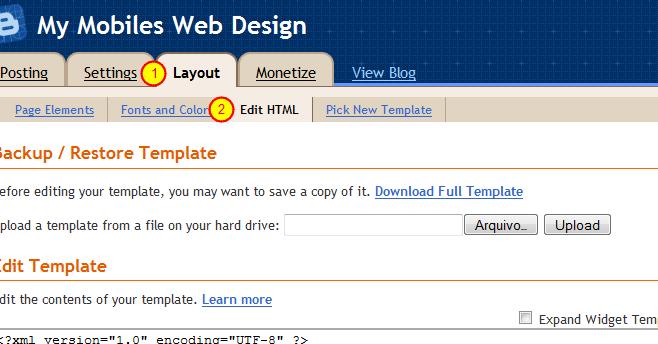
Log into your Blogger dashboard, click "Layout" and then choose "Edit HTML"


2. Saving the existing template:

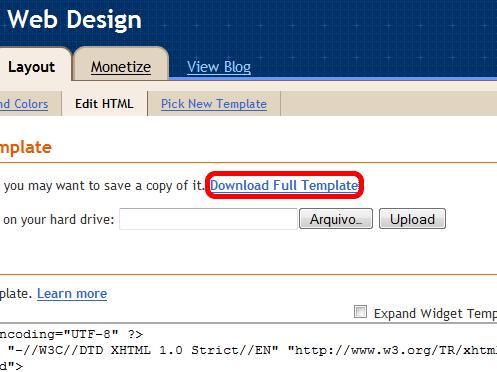
  Make sure you click "Download Full Template" before you change anything on your html. It will help you
to undo any wrong step you take. This action should be done at any time you plan to change your
template, take this as a tip for your "Blogger" life.

3. Searching the code:


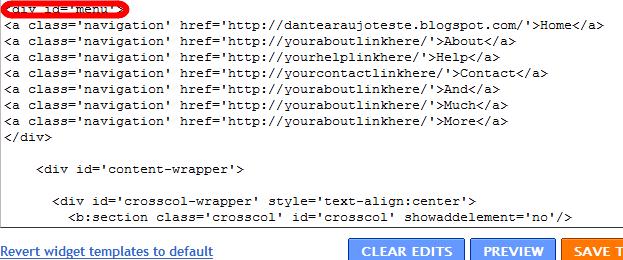
Now search the code where it says "<div id='menu'>" (This can be done by hitting CTRL+F and
typing "<div id='menu'>"). As you can see below it, we have some "a" tags (that means html tags for
links) that are basically your menu buttons. You can replace them for your own uses.


I have changed the "Contact" button link, to "mailto:youremail@gmail.com", so when people click
"Contact" they will get an email form to contact you. That's just an example, you can change them
however you'd like. You can also add or remove the buttons.

4. Finishing up: 

After editing it, just click "Save Template" and you should be OK!


Top 3 SEO Keyword Research Tools For Beating the Competition

0

| In : ,

Keyword research tools play a vital role in the process of search engine optimization as it helps in increasing the importance of your website in search engines. It is hence very important that the keyword research is done effectively to endure the competition for a given keyword and predict its future trends. Getting the right keyword can give a good ranking in search engines and hence it plays a crucial part. Keyword research needs reliable tools for its technical aspect and finding the top keyword research tools needs a better understanding. The strength of a SEO keyword research not only depends on the right tools but also on the skills of the person and these skills comes with time and practice.

Google Keywords

The first research tool that comes under the top keyword research tools is the Google keyword tool. Google keyword tool is one of the most prominent tools as this is ideally designed for keyword search and it also helps in determining the amount of traffic that frequents a keyword. For people who are using Google AdWords for their marketing campaign and to flourish their business then Google keyword is the best tool they can ever have.


Traffic Travis

Traffic Travis is the next proven tool for strategic optimization plan. This tool belongs and ranks the top keyword research tools and its analysis basically relies on how difficult it is to rank a keyword with respect to search engines. The result that comes out of such a researched keyword can give you an idea of the amount of SEO effort is needed for a keyword to be ranked. In spite of developing a well renowned marketing plan a well planned free keyword tool can give you a good start in marketing a business. It also helps in saving some investment and time on costly marketing strategies. 

Word Tracker

Word tracker is the next most well known keyword research tool. This tool comes with a paid version and the free version has a restriction on the number of queries. Other than these important and top keyword tools which is available for free, there are some paid tools which have a greater efficiency when it comes to research and analysis. The continuous update that these paid tools provides better and useful improvement. Each of the paid keyword research tools is unique even though they provide the same type of service but with a difference in their limitations.


Any type of paid of unpaid research tools can’t match the ideal keyword research tool that is Google keyword. Better keyword tools provide better results and better efficiency hence it is very important to use the right keyword research tool for marketing your business. Keyword research being the important milestone as far as Search engine optimization is considered as it determines the results of one’s efforts. There are plenty of keyword research tools and hence make sure you use the top quality ones that can assure you reliable results and a better analysis.


Search Engine Optimization Tips for Blogger

0

| In :

Many people believe that a blogger blog is not your best option if you are serious about getting online success. It is true to an extent as you have much more flexibility with a privately hosted WordPress site. WordPress has a number of wonderful plugins and themes which are great for SEO results. There are numerous success stories with blogger and it cannot be completely written off as an online platform. There are some search engine optimization techniques which can be applied to achieve great results with a blogger blog. Let’s discuss some basic search engine optimization tips for blogger.


Here is how to optimize a blogger blog to achieve great traffic and earnings:

1) Blog Title

A blog title is an important part of applying proper SEO techniques to your blog. You should carefully select a blog title to get best results. You can use Google keyword tool a keyword which has decent global search volumes and low competition and use it in the blog title.

2) Blog Description

Blog description is another significant part of the blog for search engine optimization. You should ensure that the blog description is appealing to visitors and includes the keywords you are targeting in the search engines.

3) Comments

You should always allow comments for all your blog posts. Comments are helpful as some help enhance the value of a blog post and also update the content and thereby helps to improve its search engine rankings. You should always delete short posts, spam and completely irrelevant blog posts.

4) Quality Content

Quality content is a must for you blog’s success. When you post quality content on your blog people like to read it which automatically improves traffic and earnings for your blog. It is also the safest way for building links as people link to your quality content and you get natural backlinks for your blog content.

5) Submit Blog to Search Engines and Directories

You should submit your blog to search engines and directories to get better search engine rankings.

6) Use Keywords in the Anchor Text of Links

Using keywords in anchor text of links is of vital importance to achieve best SEO results for a blog. You should use your primary and secondary keywords in the anchor text of links when getting links from other blogs or other pages on your blog.
Blogs can be a great way to achieve great search engine rankings and earn revenue. The search engine optimization tips for bloggers can help you make the most of your blogging efforts.

7 AdSense Strategies You Should Adopt

0

1.  Make room for the 728×90 banner — if you can

2. Set your channels to “Targetable”

3. Display ads alongside videos

4. Create Channels

5. Refresh!

6. Pay attention to your Analytics reports

7. Delete under-performing units

How search engines determine your rank

0

| In :

Before you try to add your site to the search engines, you should understand what they look for when they decide how to rank your site. Just because you're listed doesn't mean you'll get traffic.  You have to make sure your site is search engine ready.
The general rule of thumb is that most engines use a "formula" to determine keyword relevancy. The technical term is called an "algorithm", and each search engine has its own unique algorithm that it uses to rank pages.  
Generally, this magic formula consists of your page title, overall body content and the number and quality of links pointing back to your site, social media influence, how long people stay on your site, etc.
It's important to note that every engine is different. Some may look at inbound links (number of people linking to you), others may place more emphasis on your body content. 
You also need to know about meta tags. These are hidden descriptors that appear at the beginning of your HTML code, inside your <head> tag.  They may be invisible to your visitor's eyes, but search engine spiders can read them.
They usually consist of a title, description, and keyword tag and they look something like this:

<head>
<title>Title of Your Site</title>
<meta name="description" content="Description of your site here.">
<meta name="keywords" content="keywords separated by commas">
</head>

Because of abuse, search engines now put less emphasis on certain tags when ranking pages, but you should still include them because they do use them to display information about your site.
For example, whatever is inside the <title> tag is what the search engines will use as the title of your site in the search results. You want to use keywords that describe your page and entice visitors to click.

Getting ranked in Google

0

| In :

Getting into Google is not hard. The challenge is getting ranked. How well you rank largely depends on how many quality sites link to you.

And as social media matures, now the engines are beginning to use your connections to influence your rank.

For example, if you're logged into Google and do a search for something, the results that show up may be heavily influenced by who is in your social circles in the Google Plus Network.

Also, if you are logged out of Google, the results may be altogether different from when you were logged in.

Google is moving more toward personalized search, which means no two people will see the same results when they perform keyword searches.

Getting Indexed from Google

0

| In :

As far as getting listed goes, all search engines have spiders that roam the web and add sites to their databases as they find them. So the easiest way for Google to index/list your site is to get linked from a site already in Google's index.

The other way to let Google know about your site is to sign up with Google Webmaster Tools and create a Google XML sitemap .

If you use WordPress, install the All in One SEO plugin and that is all you really need to do. It will create and submit your sitemap for you. If you use Blogger, your sitemap is automatically created for you.

No matter what blogging platform you use, you should still create an account with Google Webmaster Tools.

Top 10 SEO Related WordPress Plugins

0

| In :

WordPress has some pretty good functions built in to help you with SEO (Search Engine Optimization), however you might find you need some plugins to help you along the way. Here are ten of my favorite WordPress plugins that have to do with making your web site work better with the various search engines out there.

All in One SEO Pack - Automatically optimizes your Wordpress blog for Search Engines (Search Engine Optimization).

Redirection - Redirection is a WordPress plugin to manage 301 redirections and keep track of 404 errors without requiring knowledge.

Search Everything - Increases Wordpress’ default search functionality through an options panel.

HeadSpace2 - Controls almost every aspect of your site’s meta-data, including advanced tagging, Analytics, and dozens of plugins. The best WordPress SEO solution!

Robots Meta - This plugin makes it easy to add the appropriate meta robots tags to your pages, disable unused archives, nofollow unnecessary links and more.
Add to Any Share/Save/Bookmark Button - Helps readers share, save, bookmark, and email your posts and pages using any service, such as Delicious, Digg, Facebook, Twitter, and over 100 more.

SEO Smart Links - SEO Smart Links provides automatic SEO benefits for your site in addition to custom keyword lists, nofollow and much more.
SEO Title Tag - Search engine optimize your blog’s title tags. Mass edit the title tags of posts, pages, category pages, tag pages - indeed, any URL!

Optimal Title - Optimal Title mirrors the function of wp_title() exactly, but moves the position of the ’separator’ to after the title rather than before.

SEO Friendly Images - SEO Friendly Images automatically adds alt and title attributes to all your images. Improves traffic from search results and makes the tags w3c/xHTML.

You might also like: