Pages

Get 1000 Likes Facebook Free

Get Free Youtube Views - TopFreeLikes.com
Showing posts with label Blogger Tips. Show all posts

General SEO Tools: Commonly used tools

0

There are many various tools which help make the job of SEO quicker. These are
some of my more commonly used tools. All the tools in this section are free.

• FireFox browser – browser allows tabbed browsing, which saves a ton of
time when I am looking at about a half dozen sites at the same time.
(http://www.mozilla.org/products/firefox)
• Firefox Bookmarks and Extensions – extensions and bookmarks I use to
customize Firefox to make SEO easier.
(http://tools.seobook.com/firefox/bookmarklets.html)
• Internet Explorer
(http://www.microsoft.com/windows/products/winfamily/ie/default.mspx)
• Internet Archive – shows the history of websites.
(http://www.archive.org/)
• Digital Point keyword ranking, backlink, and PageRank checker – I use this
tool to view my position for various websites in Google, Yahoo!, and
MSN. It also helps me hypothesize some of the ways they may have
changed their algorithms.
(http://www.digitalpoint.com/tools/keywords)
• Xenu Link Sleuth – finds broken links on your site, and helps you build a
sitemap. (http://home.snafu.de/tilman/xenulink.html)
• Sitemaps Protocol – official xml sitemap protocol supported by the major
search engines. Please note that these xml sitemaps are different than your
internal sitemaps. (http://www.sitemaps.org/)
• Free Meta Tag Generator – helps you create the code for your page title
and meta tags
(http://tools.seobook.com/meta-medic/)
• The Google Toolbar – good for highlighting keyword proximity and usage
and doing many things like giving you a quick glimpse of a cached copy of
a page. (http://toolbar.google.com/) If you are doing lots of exceptionally
aggressive promotional techniques it may be unwise to install any toolbar
distributed by a major search engine since it will help them track and cross
reference your sites.
• Google Toolbar buttons - if you use the Google toolbar for Internet
Explorer you can create custom buttons to act as an RSS reader or link to
various useful tools, like a site’s WhoIs history. I created a number of
buttons here (http://tools.seobook.com/buttons/)
• Show IP – FireFox extension shows what IP Google results are coming
from (http://l4x.org/site/node/1078)
• GoLexa – SEO Swiss Army Knife tool (http://www.golexa.com/)
• Office application. Things like spreadsheets make life much easier as an
SEO. I use MicroSoft Office sometimes (http://office.microsoft.com/)
and sometimes I use OpenOffice (http://www.openoffice.org/). Either
will probably work for most jobs. OpenOffice can create PDF documents
for free. The newest beta version of Internet Explorer also can produce
PDF documents from web pages.
• Myriad Search – meta search service which makes it easy to compare the
top search results from the major search engines
(http://www.myriadsearch.com/)
• Espion – Free download application which makes it easy to change your
user agent to check for user agent based cloaking.
(http://tools.webguerrilla.com/new-browser-app/)
• Content generation & scripting: http://www.elance.com is an online
auction where people bid on your projects. You can find real bad deals and
real gems there. http://www.constant-content.com is a content bank full
of content for sale. The US government and the BBC are also offering free
RSS feeds. Some people also use sites like http://craigslist.org/ to look for
affordable writers.

Windows Live Writer to increase SEO

0

| In : ,

Windows Live Writer is software from new Microsoft software pack called
Windows Live Suite. It provides many useful features for all bloggers including
professionals and beginners. It's really easy to use, with very nice "MSN like"
style, with nice elements and all necessary tools provided. Windows Live Writer
is completely free software which can save you a lot of time. Fully supports
Blogger accounts.

It's really impressive how this great tool works. When you setup your account,
you will be able to add many things on your blog like:

Pictures - Great tool with some unique features like automatic effects or
watermark inclusion, image alt tags, shadows, position and more.

Tables - Insert tables easily in your weblog, without using any other external
applications or services.

Maps - Integrate maps locations in your blog. Very easy and useful feature.
Powered by Microsoft Virtual Earth application.

Tags - Easily insert tags for your blog posts. Supports tags from Technorati,
LiveJournal, Flickr, Del.icio.us, ice rocket, 43 things and more.

Insert Video - Easily upload or insert video to your weblog using this function.
Great tool for blogs with lot video integrated.

Insert Hyperlink - Of course you can add links with this nice tool. Advanced
options are available also. So everything you need is here.

One of the great features is that you can preview your post within your blog
template, without any database mistakes and you can easily do that even
offline. Really great way to see how everything will look in the future. It's like
"live" but offline function, really great addition for this kind of software.
Visit my full review of this software and Download Windows Live Writer
completely for free!
Note: You will need this tool for the next important step!

Blog Title Tags

0

By default, Blogger titles are not well optimized. Specially if you have long Blog
name. In this e-book i will take my domain and my blogger title.
Default Blogger Title Tag:
post – POST NAME
After Optimization of Title Tag:
POST NAME  ~ post

Note: Title tags are displayed on search engine result pages and they are visible
on your Browser title bar.
To change Title tags in your Blogger powered blog, you will need to login into
your Blogger account and go to Layout>Edit HTML (displayed on below
picture).


In Editing field scroll little and find <TITLE><DATA:BLOG.PAGETITLE/></TITLE>  tag. Select all
tag and Copy-Paste following code instead:

<B:IF COND='DATA:BLOG.PAGETYPE == "ITEM"'>
<B:SECTION ID='TITLETAG'>
<B:WIDGET ID='BLOG2' LOCKED='FALSE' TITLE='BLOG POSTS' TYPE='BLOG'>
<B:INCLUDABLE ID='COMMENTS' VAR='POST'/>
<B:INCLUDABLE ID='POSTQUICKEDIT' VAR='POST'/>
<B:INCLUDABLE ID='MAIN' VAR='TOP'><TITLE><B:LOOP VALUES='DATA:POSTS'
VAR='POST'><B:INCLUDE DATA='POST' NAME='POST'/></B:LOOP> ~
<DATA:BLOG.TITLE/></TITLE></B:INCLUDABLE>
<B:INCLUDABLE ID='BACKLINKDELETEICON' VAR='BACKLINK'/>
<B:INCLUDABLE ID='FEEDLINKSBODY' VAR='LINKS'/>
<B:INCLUDABLE ID='BACKLINKS' VAR='POST'/>
<B:INCLUDABLE ID='STATUS-MESSAGE'/>
<B:INCLUDABLE ID='FEEDLINKS'/>
<B:INCLUDABLE ID='NEXTPREV'/>
<B:INCLUDABLE ID='COMMENTDELETEICON' VAR='COMMENT'/>
<B:INCLUDABLE ID='POST' VAR='POST'><DATA:POST.TITLE/></B:INCLUDABLE>
</B:WIDGET>
</B:SECTION>
<B:ELSE/>
<TITLE><DATA:BLOG.PAGETITLE/></TITLE>
</B:IF>

 After that, click on Save Template button.


What's Search Engine Optimization?

0

| In : ,

Search Engine Optimization or shortly SEO is advanced and very popular
webmaster related option. Allows you to optimize your site or Blogger powered
blog to be much more search engine friendly (SE-Friendly). By this way, you will
get more quality visitors from main search engines – specially from Google.
This is very important factor for every Web Site, Blog or Forum Board. Simply
because most of traffic comes from search engines like Google, Yahoo, Live,
Ask...
Following steps in this E-Book, you will optimize your Blogger site easily and
completely for free. Every software, product and related articles displayed in
this book are completely free.
I have write this book because i want to see more quality and professional
blogs based on this free blogging service from Google.
By default, Blogger SEO factor is too low. But, following these steps on this ebook,
you will optimize your Blogger powered blog very easily. All you need is
to read and follow them carefully.
Note: Do not miss any step, because if you do, you will not get best possible
results.

Step 1: Blog Title Tags
Step 2: Keyword Meta Tags
Step 3: Windows Live Writer
Step 5: Google and Yahoo Sitemap Submission

6 Reasons You’re an Unsuccessful Blogger

0

| In :

It is not that easy to be a successful blogger. It needs devotion, hard work and sometimes a fair share of luck to be able to overcome all the teething problems. But sometimes, despite all your hard work, your blog fails to win the favor of the readers. So, it is good for you and sometimes for your readers too to check some signs that may help you see what the fate has in store for your blog. Once you get the divine signals that your blog does not stand a chance to make it big in the blogosphere, you should go ahead and embrace something else that you are good at:


You hate To Write: I have come across some bloggers who have no passion for writing. They are just into blogosphere just to earn some quick cash. Since blogosphere is getting crowded every single day, you should not expect that your blog will start churning out money within the next 6 months; you are just living in a fool’s paradise. Rather than wasting your time here, you should try your luck somewhere else.

You are pathetic at Grammar: It is not necessary that you have to be native English writer, but that should be an excuse for writing English that is pathetically poor.  If you are not comfortable or not confident in writing in English, you should force yourself. Rather try to do blogging in your own mother tongue. Google is getting smarter in other languages, getting traffic will not be an issue any more.

You are not Creative: The concept of blogging is entirely based on how much creative you are. Unless you are creative, you will find it difficult to hook on the attention of the visitors. Your creative appeal is directly proportional with the number of visitors you will be able to retain. So, if you feel that your creativity is flickering away with the passion of time, you need to shift to other domain.

You Like To Avoid Social Media: You should not depend entirely on Google to keep alive your blog. Google may pull the rug from your feet and you blog will have a slow death. So, you need to adopt a social media marketing strategy and if you find that you are not good at marketing your website in social media, you are sure to face a tough situation ahead.

You cannot take Criticism: Not all readers are same and therefore, you cannot expect that you will receive unabashed eulogy for a post you have written after so many hours of hard work.  There are some who out outspoken and that means, some negative comments might appear. But that does not mean that you should go on insulting the readers. You need to master the art of taking criticism into your grace. However, if you feel that you are unable to do so, I must say the career of blogging is not for you. 

 You Are Blogging On Subjects You Are Not Aware Of: This is a blogging crime. You should not reshape content of others by making small changes in the texts or by using synonyms just to make it look unique to CopyScape. You need to make sure that the articles are adding value to users experience and they are not just the reproduction of the same content available easily over the net. However, if you cannot help but doing this, I must say blogging career is not for you.

How to Make your Blogger Blog ready for Mobile Phones

0

| In :

As you know, millions of people use their mobile phones to access internet. The mobile internet speed is also very fast these days with 3G's , mobile apps,etc.

From this, we can say many of your readers are coming to your blog through mobile phones..But, if you don't make your blog mobile friendly, .you may lose all your mobile readers because in a mobile phone, a normal blog takes lot of time to load and there are other issues that your site not fitting properly in the mobile screen.

So, here is how to make your Blogger (blogspot) blog mobile internet friendly..

Sign into your Blogger account > Design > Edit html
Find this line..(Click Ctrl+F) 

<b:include data='blog' name='all-head-content'/>
 
Paste this code below that line...(Click Ctrl+V)

<meta content='IE=EmulateIE7' http-equiv='X-UA-Compatible'/>

<b:if cond='data:blog.isMobile'>

<meta content='width=device-width, initial-scale=1.0, user-scalable=0' name='viewport'/>

<b:else/>

<meta content='width=1100' name='viewport'/>

</b:if>

Save the Changes!

That's it! Now, your visitors can access your blogger blog through mobile phones with blazing speed...
  

How to add keywords to blogger ?

0


 If you want to add Keywords to your blog just copy and past this code below in your HTML rdit
Notice: Don't forget to download your full template before editing
Code:
<head>     <b:include data='blog' name='all-head-content'/>     <b:if cond='data:blog.pageType == &quot;item&quot;'> <title><data:blog.pageName/> - <data:blog.title/></title> <b:else/> <title><data:blog.pageTitle/></title> </b:if> <b:if cond='data:blog.url == &quot;http://YOUR-BLOG-ADDRESS-HERE&quot;'> <meta content='YOUR PAGE DESCRIPTION HERE' name='description'/> <meta content='YOUR KEYWORDS HERE' name='keywords'/></b:if> <b:if cond='data:blog.url == &quot;http://YOUR-POST-ADDRESS-HERE&quot;'> <meta content='YOUR POST DESCRIPTION HERE' name='description'/> <meta content='YOUR KEYWORDS HERE' name='keywords'/></b:if> <b:if cond='data:blog.url == &quot;http://YOUR-PAGE-ADDRESS-HERE&quot;'> <meta content='YOUR PAGE DESCRIPTION HERE' name='description'/> <meta content='YOUR KEYWORDS HERE' name='keywords'/></b:if>
 
 If you have alot of posts just do the same following code and edit it 
 
<b:if cond='data:blog.url == &quot;http://YOUR-PAGE-ADDRESS-HERE&quot;'> <meta content='YOUR PAGE DESCRIPTION HERE' name='description'/> <meta content='YOUR KEYWORDS HERE' name='keywords'/></b:if>


Back up Your Blog

0

| In :

Back up blog? is it important?
Yes it's very important. Because we can't guarantee that our blog will exist forever. Lately, many blogers lost their blogs because of unpredicted fault . Few months ago I lost all of my blog (it'a about 10 blogs), but now I got some of them back. Since then I know how important to back up our blog. It's really frustating when your hard work suddenly lost.

There is a free service website that allow us to back up our blog. It's name is blogbackuponline. They give us a space for 5 MB. Althought it's small but I think it's enough for us to backup our blog. If our avarage posted arcticle is 1000 character, meaning it can backup until 5000 title. It's for free version. They also provide more features for premium account. Just go to blogbackuponline and back up your blog there.

How to delete a Blogger blog in New Interface

0

| In :

Many bloggers do not know how to delete a Blogger (blogspot) blog. The method depends on whether you are still using the old Blogger UI (User Interface) or the new UI. It is not difficult if you know where to look or where to click. The problem is, it is not obvious where to look, but this post will show you where and how. Below are the instructions to delete a blog together with screenshots to make the task easier for you.

As above, first sign into www.blogger.com to access the Dashboard. Click on the drop-down menu and then click SETTINGS:


The on the left sidebar, click on OTHER and option to delete blog will be under the default BLOG TOOLS. Click DELETE and it is done:


How to delete a Blogger blog in Old Interface

0

| In :

Many bloggers do not know how to delete a Blogger (blogspot) blog. The method depends on whether you are still using the old Blogger UI (User Interface) or the new UI. It is not difficult if you know where to look or where to click. The problem is, it is not obvious where to look, but this post will show you where and how. Below are the instructions to delete a blog together with screenshots to make the task easier for you.

To delete a blog is a more straight forward. First sign into www.blogger.com to access the Dashboard, Click on the SETTINGS tab and the default sub-tab will be BASIC. Click DELETE and it is done.


Editing the menu bar on Gear for Blogger

0

This quick tutorial will show you how to edit the links at this template's menu bar. By doing that you can
add your own menu sections and link to your own stuff. You'll need to have a little knowledge with html
tags, but nothing too advanced, any beginner should get it done easily.

1. Starting out:


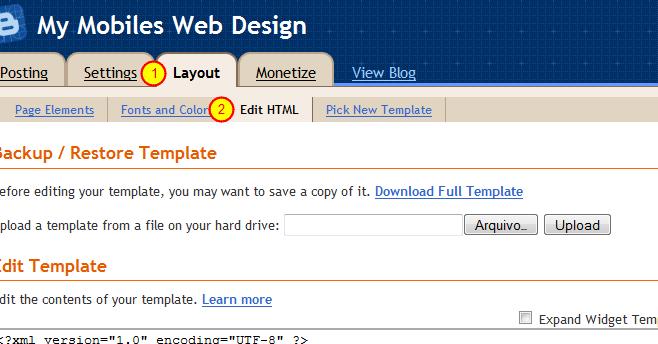
Log into your Blogger dashboard, click "Layout" and then choose "Edit HTML"


2. Saving the existing template:

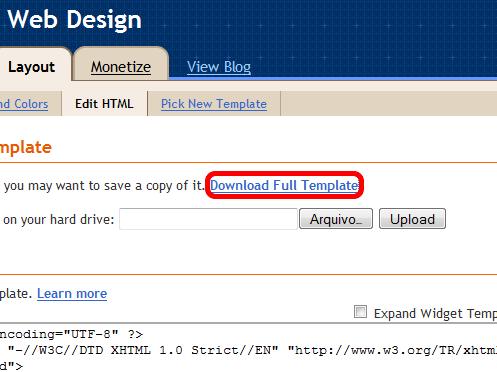
  Make sure you click "Download Full Template" before you change anything on your html. It will help you
to undo any wrong step you take. This action should be done at any time you plan to change your
template, take this as a tip for your "Blogger" life.

3. Searching the code:


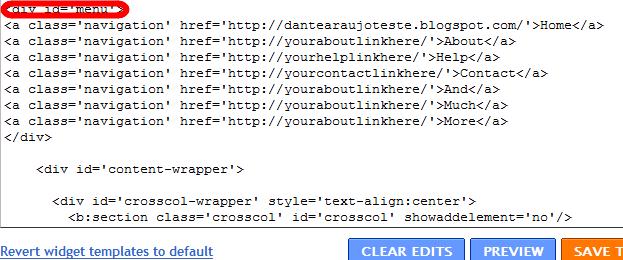
Now search the code where it says "<div id='menu'>" (This can be done by hitting CTRL+F and
typing "<div id='menu'>"). As you can see below it, we have some "a" tags (that means html tags for
links) that are basically your menu buttons. You can replace them for your own uses.


I have changed the "Contact" button link, to "mailto:youremail@gmail.com", so when people click
"Contact" they will get an email form to contact you. That's just an example, you can change them
however you'd like. You can also add or remove the buttons.

4. Finishing up: 

After editing it, just click "Save Template" and you should be OK!


7 AdSense Strategies You Should Adopt

0

1.  Make room for the 728×90 banner — if you can

2. Set your channels to “Targetable”

3. Display ads alongside videos

4. Create Channels

5. Refresh!

6. Pay attention to your Analytics reports

7. Delete under-performing units

You might also like: